> ## Content Index
> Fetch the complete content index at: https://www.process-one.net/llms.txt
> Use this file to discover other available public pages before exploring further.
# XMPP integration with n8n
- URL: https://www.process-one.net/blog/xmpp-integration-with-n8n/
- Published: 2026-01-12T16:57:46.000Z
- Updated: 2026-03-19T14:42:36.000Z
- Description: How to interface an n8n workflow with an XMPP network
- Author: Jérôme Sautret
- Tags: XMPP, n8n
[n8n](https://n8n.io/?ref=process-one.net) is a platform for workflow automation. Let's see how interface n8n workflows with an XMPP network. As an example on how to use XMPP to receive data from n8n, let's build a simple workflow that publishes into a [MUC room](https://xmpp.org/extensions/xep-0045.html?ref=process-one.net) some information about each commit pushed to a GitHub repository.
# Simple workflow to display Git commits in a MUC room
You can browse and download this workflow here: [https://share-n8n.net/shared/l6uiZZ54bPC3](https://share-n8n.net/shared/l6uiZZ54bPC3?ref=process-one.net)
## GitHub Trigger
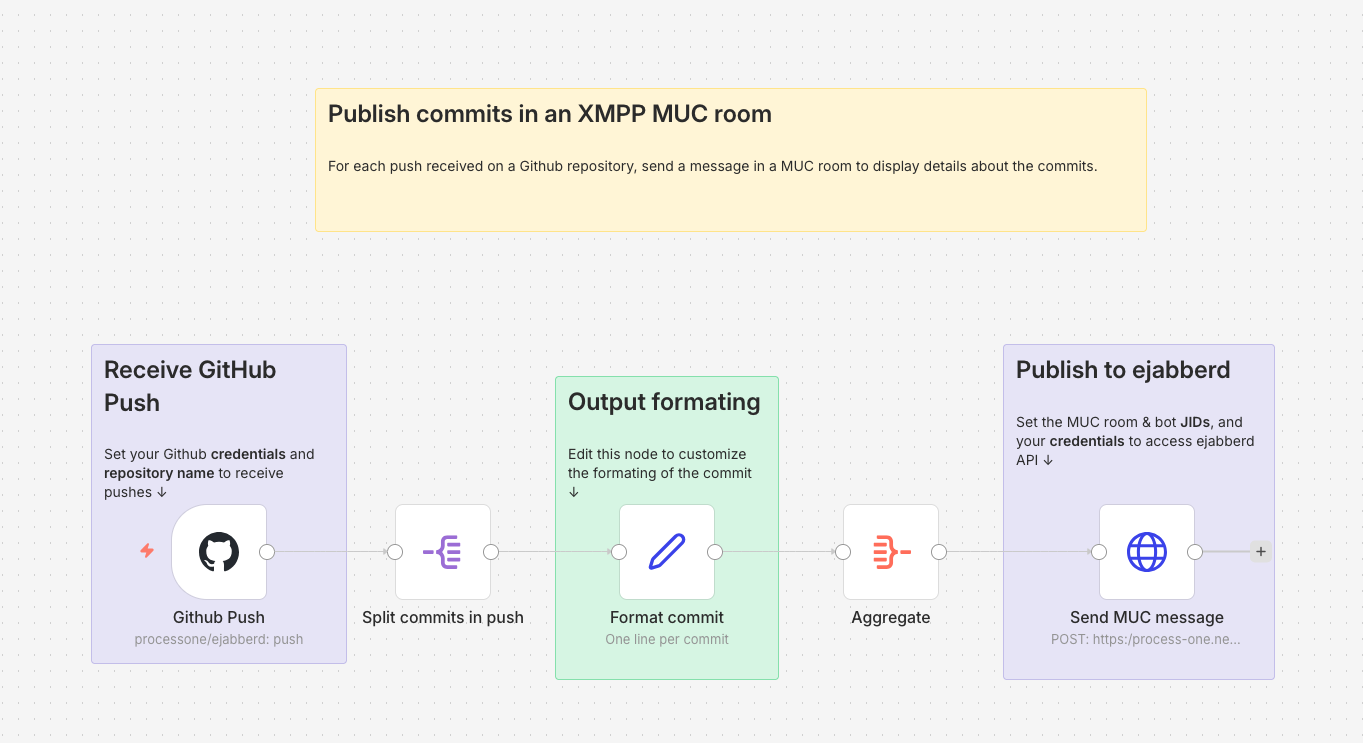
To receive the information about each Git push, we use the [*GitHub Trigger* node](https://docs.n8n.io/integrations/builtin/trigger-nodes/n8n-nodes-base.githubtrigger/?ref=process-one.net). You need to set up some [GitHub credentials](https://docs.n8n.io/integrations/builtin/credentials/github/?ref=process-one.net) with access to the repository you want to monitor. Then, set the *Repository Owner* and *Repository Name* accordingly. The *Events* you want to receive are of type *Push*. At this point, you can execute the workflow (just containing this unique node), do a couple of commits on your repository, and push them to test that it's received by the GitHub Trigger node. When it works, pin the output data of the node so you don't have to push some more commits while you test the rest of the workflow. Don't forget to unpin it once you want to use the workflow for real.
## Information Formatting
As you can see in the output data of the *GitHub Trigger* node, the list of commits in the push are in `body.commits`. We use a [*Split Out* node](https://docs.n8n.io/integrations/builtin/core-nodes/n8n-nodes-base.splitout?ref=process-one.net) on this field to process each one of these commits.
We then use an [*Edit Fields (Set)* node](https://docs.n8n.io/integrations/builtin/core-nodes/n8n-nodes-base.set/?ref=process-one.net) to format the information we will display about each commit in the final message posted in the MUC room, using a *Manual Mapping*. Just check the input data coming by the previous *Split Out* node to choose what data you want to send to the MUC room. We name the output field `Commit` (type: *String*). Here is an example of such a template:
```javascript
"{{ $json.message.split('\n')[0] }}" by {{ $json.author.username }} ({{ $json.author.name }} <{{ $json.author.email }}>), {{ $json.modified.length }} modified file{{ $json.modified.length >1 ? "s" : "" }}
```
The split at the beginning of this example is used to only keep the first line of the commit message.
After that, an [*Aggregate* node](https://docs.n8n.io/integrations/builtin/core-nodes/n8n-nodes-base.aggregate/?ref=process-one.net) will combine the commits info (one per item) into a single item, with this setting:
- *Aggregate*: [Individual Fields](https://docs.n8n.io/integrations/builtin/core-nodes/n8n-nodes-base.aggregate/?ref=process-one.net#individual-fields)
- *Input Field Name*: `Commit` (as named in the previous node)
As a result, we'll have one item containing the list of commits into a `Commit` field.
## ejabberd credentials
We can now send the formatted data to the XMPP server using a [*HTTP Request* node](https://docs.n8n.io/integrations/builtin/core-nodes/n8n-nodes-base.httprequest/?ref=process-one.net). For that, we use the [send\_message command](https://docs.ejabberd.im/developer/ejabberd-api/admin-api/?ref=process-one.net#send%5Fmessage) from the ejabberd API.
We use an [OAuth](https://docs.ejabberd.im/developer/ejabberd-api/oauth/?ref=process-one.net) token to securely call ejabberd API using [Bearer Authentication](https://swagger.io/docs/specification/v3%5F0/authentication/bearer-authentication/?ref=process-one.net).
### Fluux
If you are using a [Fluux instance](https://fluux.io/?ref=process-one.net), you can get an OAuth token from your Fluux console, in the *API Tokens* section.
### Self-hosted ejabberd
To create the credentials on your own ejabberd server, you'll need to use the [oauth\_issue\_token command](https://docs.ejabberd.im/developer/ejabberd-api/admin-api/?ref=process-one.net#oauth%5Fissue%5Ftoken) to get an OAuth token. Be sure you have an [access rule](https://docs.ejabberd.im/admin/configuration/toplevel/?ref=process-one.net#oauth%5Faccess) that allows you to create such a token.
For the scope parameter of `oauth_issue_token` command, use the one defined in your [api\_permissions](https://docs.ejabberd.im/developer/ejabberd-api/permissions/?ref=process-one.net) acl (`ejabberd:admin` in the example below) and be sure the user you issue the token for has the right to call the `send_message` command.
Extract of an example of an `ejabberd.yml` file that allows to call `send_message` using OAuth:
```yaml
hosts:
- "process-one.net"
listen:
-
port: 5281
ip: "::"
tls: true
module: ejabberd_http
request_handlers:
"/api": mod_http_api
acl:
admin:
user:
- "admin@process-one.net"
access_rules:
muc:
- allow: all
muc_create:
- allow: local
muc_admin:
- allow: admin
oauth_access:
- allow: admin
api_permissions:
"console commands":
from:
- ejabberd_ctl
who: all
what: "*"
"admin access":
who:
- oauth:
- scope: "ejabberd:admin"
- access:
- allow:
- acl: admin
what:
- send_message
modules:
mod_http_api: {}
mod_muc:
access: muc
access_create: muc_create
access_persistent: muc_create
access_admin: muc_admin
```
Example of a command to create a token with the above config:
```shell
ejabberdctl oauth_issue_token admin@process-one.net 360000 ejabberd:admin
```
## Sending the XMPP message using send\_message
Now you can create your credentials in the *HTTP Request* node:
- **Authentication**: [Predefined Credential](https://docs.n8n.io/integrations/builtin/core-nodes/n8n-nodes-base.httprequest/?ref=process-one.net#predefined-credentials) Type
- **Credential Type**: [Bearer Auth](https://docs.n8n.io/integrations/builtin/credentials/httprequest/?ref=process-one.net#using-bearer-auth)
- Create a new **Bearer Auth** and put your token in the **Bearer Token** field.
For the other fields in the *HTTP Request* node:
- **Method**: `POST`
- **URL**: Full URL of the `send_message` command as defined by your [ejabberd\_api](https://docs.ejabberd.im/admin/configuration/modules/?ref=process-one.net#mod%5Fhttp%5Fapi) listener, for example `https://process-one.net:5281/api/send_message`. If you are using [Fluux](https://fluux.io/?ref=process-one.net), the URL should be `https://NAME.m.in-app.io:5281/api/send_message` where `NAME` is your Fluux instance name.
- [**Send Body**](https://docs.n8n.io/integrations/builtin/core-nodes/n8n-nodes-base.httprequest/?ref=process-one.net#send-body): enabled
- [**Body Content Type**](https://docs.n8n.io/integrations/builtin/core-nodes/n8n-nodes-base.httprequest/?ref=process-one.net#json): `JSON`
- **Specify Body**: `Using Fields Below`
- **Body Parameters**: set the parameters for the [send\_message command](https://docs.ejabberd.im/developer/ejabberd-api/admin-api/?ref=process-one.net#send%5Fmessage):
- `type`: `groupchat`
- `from`: bare JID of the bot that will post the message in the MUC room
- `to`: bare JID of the MUC room
- `subject`: empty (not relevant for a MUC message)
- `body`: template to format the commit information. For example, to display the name of the repository followed by the list of commits, one per line:
```javascript
{{ $('Github Push').item.json.body.repository.full_name }} repository:
{{ $json.Commit.join("\n") }}
```
The n8n workflow should now be working: it will publish all commits pushed on the repository defined in the first node into the MUC room defined in the last node (don't forget to unpin everything).
# Same workflow with a custom stanza
You can browse and download this workflow here: [https://share-n8n.net/shared/nxmUMbdNM0gH](https://share-n8n.net/shared/nxmUMbdNM0gH?ref=process-one.net)
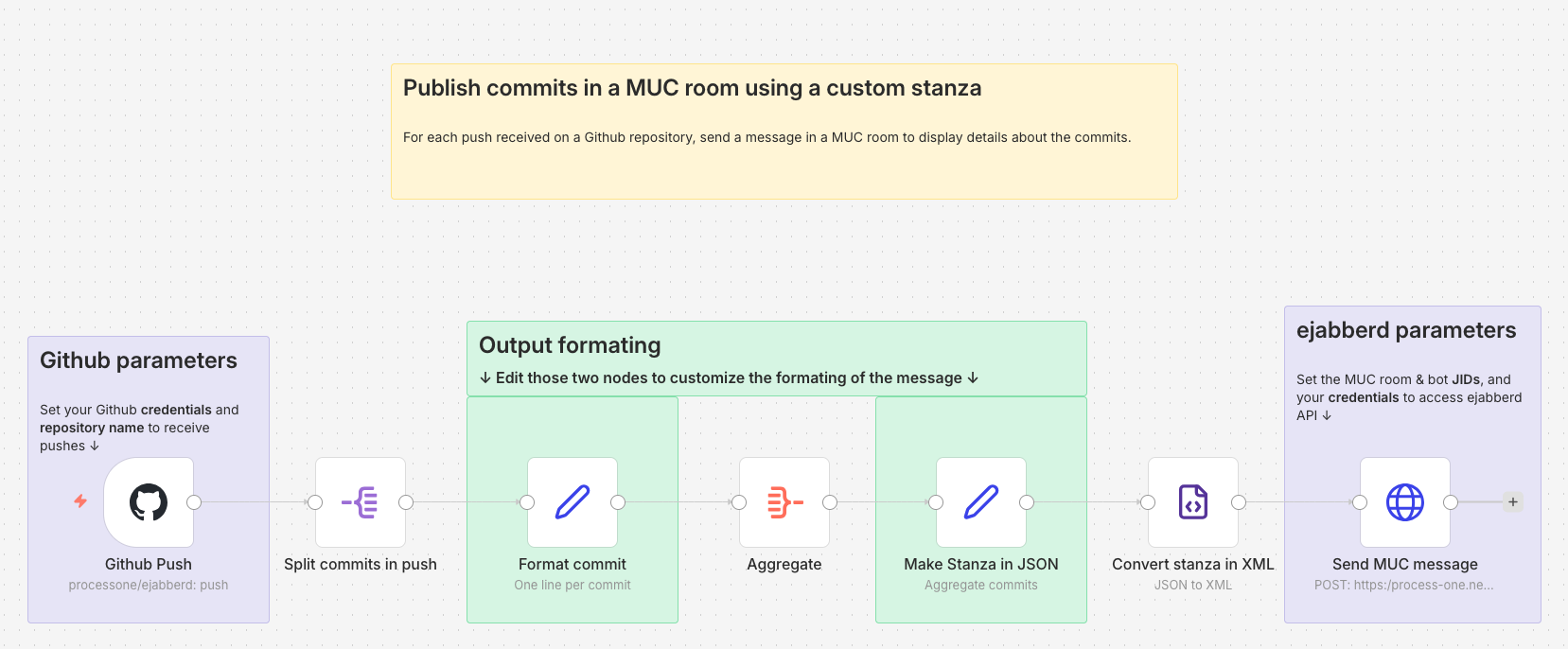
This is a variant of the above workflow to illustrate how to create and send a custom stanza instead of the simple message that `send_message` API permits. This is needed for example if you want to add an element in a custom namespace into your message stanza.
The minimal stanza for a [MUC message](https://xmpp.org/extensions/xep-0045.html?ref=process-one.net#message) is:
```xml
List of commits
```
We don't need to set the `from`, `to` or `id` attribute, it will be handled by the API call done in the last node. Let's say we want to add a sub-tab containing the timestamp of the moment the message was sent by n8n. The stanza we want to create looks like this:
```xml
List of commits
2025-12-17T11:16:13.071-05:00
```
## Create a custom stanza
We want to create that stanza just before the last one, between the *Aggregate* node and the *HTTP Request* node. To ensure that all strings from the git commit are correctly encoded for XML, we use the [**JSON to XML** node](https://docs.n8n.io/integrations/builtin/core-nodes/n8n-nodes-base.xml/?ref=process-one.net). This means we have to construct the stanza in JSON first.
This is done in the **Make Stanza in JSON** node of type [*Edit Fields (Set)*](https://docs.n8n.io/integrations/builtin/core-nodes/n8n-nodes-base.set/?ref=process-one.net). We use the *Manual Mapping* to ensure all special characters from the git commit are correctly escaped.
- We set a `$` field (which is the default [**Attribute Key**](https://docs.n8n.io/integrations/builtin/core-nodes/n8n-nodes-base.xml/?ref=process-one.net)) to set the **type** attribute on the root element. The name of the root element, `message`, will be set in the next node, **JSON to XML**.
- We create a `body` field of type *String* that will contain the list of commits, one per line. We can use the same template used in the last node of the previous workflow:
```javascript
{{ $('Github Push').item.json.body.repository.full_name }} repository:
{{ $json.Commit.join("\n") }}
```
- We add a `n8n` field for the custom tag, with type `Object`, to be able to set a `xmlns` attribute on it:
```json
{
"_": "{{ $now }}",
"$": {"xmlns": "p1:custom:timestamp"}
}
```
## Convert the stanza in XML
The stanza is converted in XML in the **Convert stanza in XML**, *XML* node:
- The **Mode** is *JSON to XML*
- **Property Name** is the name of the field in the output data, let's name it `stanza`.
- We have to enable the **Headless** option to prevent the XML header to be added before the message.
- The **Root Name** is set to `message` (the root element of the stanza) as the JSON received from the previous node is just the content of the XML document.
## Sending the XMPP message using send\_stanza
The configuration of the *HTTP Request* node is the same than for the previous workflow, except that the URL must call [send\_stanza](https://docs.ejabberd.im/developer/ejabberd-api/admin-api/?ref=process-one.net#send%5Fstanza) instead of `send_message`. The `body` parameter is replaced by the `stanza` one, in which we just have to set the `stanza` field from the previous node:
```json
{{ $json.stanza }}
```
Be sure to adapt your ejabberd configuration accordingly, specifically to allow `send_stanza` to be called.