
Fluux Messenger 0.17.2: gapless history, faster transfers, and emoji autocomplete
Version 0.17.2 lands a week after 0.17.1. It is another focused follow-up: close the gaps that could still appear in conversation history, make file transfers on the desktop substantially faster, and add the composer conveniences that were missing.


History without gaps
The largest piece of work in this release is the kind you only notice when it is absent.
- Interrupted archive syncs now heal. If a sync of the message archive (XEP-0313) was cut short, a conversation could be left with a silent gap: messages that were never fetched, and nothing on screen to say anything was missing. Interruptions are now detected and repaired from both directions.
- History no longer depends on your read position. Opening a conversation you had already read elsewhere could show an empty history on a new or freshly cleared device. The archive now downloads independently of how far you had read.
- A conversation read on another device opens at its live edge, instead of restoring a saved scroll position that multi-device sync had already made obsolete.
- The new-messages divider and the unread badge on the scroll-to-bottom button follow your read position, consistent with the sidebar and with read-marker sync (XEP-0490).
These are the paths we found and could reproduce. Archive sync has a long tail, and how it behaves depends a good deal on which server you are talking to. If you still see a conversation with history missing, we would love to hear about it.
Faster file transfers
- Desktop uploads and downloads are handled by native code. Transfers of large files are much faster and more reliable.
- Encrypted attachments decrypt on download. An end-to-end-encrypted attachment used to be decrypted only for the inline preview, so saving it to disk gave you something unreadable. Files of every type now arrive readable.
Emoji autocomplete & polish
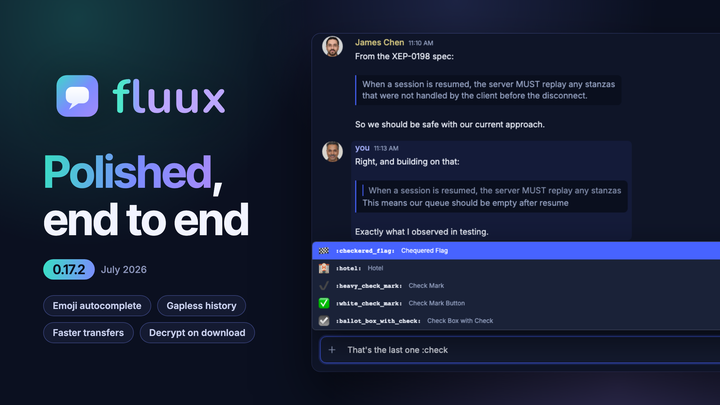
- Type a colon and a keyword to complete emoji inline. Arrow keys move through the matches, Enter or Tab inserts.
- The send button answers with a press and a glow pulse when a message goes out.
On the web
- An unread badge on the app icon for the installed PWA.
- Media is cached by the service worker, so images are not re-downloaded on every visit.
- Repeated messages from one sender coalesce into a single "N new messages" notification instead of a stack.
- An update that was downloaded but parked is now applied at launch, instead of the installed app trailing the deployed build indefinitely.
Reliability and platform fixes
Twenty-three fixes in this release. The ones most likely to have affected you:
- Notifications behave. Clicking a reaction notification always jumps to the reacted message, reopening a conversation no longer re-posts a notification for something you have already seen, and an encrypted message with no readable content stays silent until it is decrypted instead of posting a blank notification and playing a sound.
- The sidebar holds still. A delayed message, whether an offline replay or a catch-up copy older than what you already have, no longer drags the conversation preview back to older text. The sidebar also keeps its scroll position while conversations reorder during catch-up.
- Authentication. A wrong saved password no longer triggers an endless keychain retry loop, and connecting to a server whose domain contains non-ASCII characters now works.
- Key backup. The backup passphrase is used exactly as it is displayed, so backups restore in other XMPP clients. Older backups still open, and are healed to the portable format on restore.
- Group chats. The public room directory no longer lists duplicate rooms or reaches past your server's own directory, and a room notification banner no longer reappears when the room is reopened.
Smaller ones round out the release: the quoted-message and reply cards stay visually distinct when a message is selected, your own message group re-fits its width once an image inside it finishes loading, the typing indicator is centered between the last message and the composer, and the macOS traffic-light buttons stay centered in the app bar.
Get it
Fluux Messenger 0.17.2 is available for macOS, Windows, and Linux, or directly in your browser.
If you upgrade and something feels off, tell us. Bug reports and feature requests both go to GitHub Issues.