
Fluux Messenger 0.17.3: your last read position everywhere, and unread counts you can trust
Version 0.17.3 is above all a bug-fix release: forty-two fixes, seven behaviour changes and three additions.


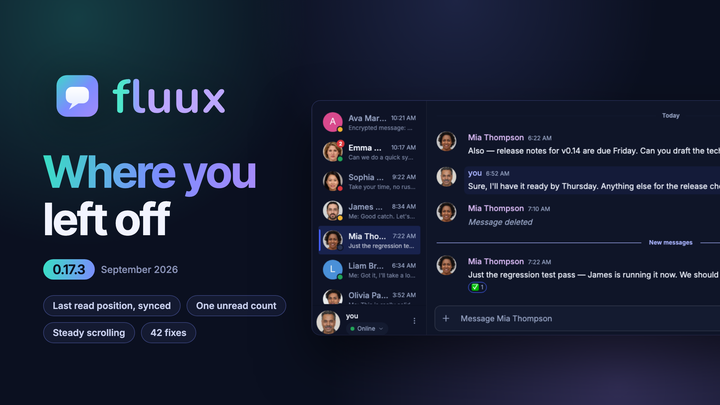
The largest single piece of that work is where you stopped reading, and how Fluux shares that position with your other clients. The rest is spread thin on purpose: badges that would not clear, a "New messages" line that kept coming back, a conversation that moved while you were reading it, failures that never said why.
Where you left off, on every client
Every XMPP client on your account should agree on where you stopped reading. Fluux publishes that position with XEP-0490, and this release closes the cases where the publication used to stall.
- Your read position now leaves the device in the cases where it used to get stuck: after you reply in a one-to-one chat, in a conversation with nothing currently loaded, and after a first attempt that did not go through. Your other clients stop showing a stale "New messages" line and an inflated badge.
- A position arriving from another client is no longer dropped when Fluux cannot yet place it in its own history. It is kept and applied the moment you open the conversation.
- A conversation whose oldest messages have aged out of the server archive no longer freezes your position. Fluux could stop publishing that conversation altogether, which left your other clients months behind.
- A group chat you read elsewhere now shows what your other clients show, instead of sitting at zero unread with no read marker while they display both.
One unread count, everywhere it appears
There used to be more than one way to answer "how many messages are unread here", and the answers could disagree. Now there is one: the messages that sit after your last read position. Every surface that shows a number reads that same number.
- The sidebar badge, the "New messages" divider, the floating pill and the scroll-to-bottom badge always agree. A conversation left in the background no longer under-counts, and opening a conversation no longer zeroes its badge before you have read anything.
- The divider stays where it is while you are looking at it. It no longer reappears every time you reopen a conversation you have already read to the end.
- A badge that reading could not clear is gone. Your read position also stops moving backwards when the last message you read is missing from the loaded history.
- Rooms say more at a glance: a room row now tells you how many messages are unread, and the unread dot and the mention badge moved after the timestamp so they line up down the list.
A conversation that stays where you put it
Scrolling is how you navigate a conversation. It should never happen on its own.
- Closing an image or a dialog with Escape keeps your place. A late-arriving older message no longer pushes a scrolled-up reader backwards in time either.
- Returning to a room lands where you left it. Opening a room whose read position predates the loaded history no longer strands you at the oldest message, and Home works immediately after opening a conversation.
- The view stays on the newest message when a late link preview, reaction or attachment makes the last message taller, and when the composer collapses back to one line after you send.
- The typing indicator no longer covers messages. Its label wraps to a second line instead of being cut off.
When something fails, Fluux tells you
Silence is the worst answer an app can give.
- Older messages that could not be loaded now show a marker, right above the button that tries again.
- A bookmarked room that could not be rejoined says why: the room wants a password, or your nickname is already taken by somebody else in it, or it only admits members. Joining a password-protected room asks for the password wherever you join from, the sidebar, an invitation or Browse Rooms, and remembers it for next time.
- A message that cannot be read explains which problem it hit: a key this device does not have, an invalid signature, or content that could not be parsed, instead of always blaming a missing key.
- Opening a conversation shows a loading indicator and lets you go back while history loads, and an update that has to upgrade your local history shows a progress bar while it does.
Faster catch-up
- Launching after a long absence and opening a conversation are both faster. Fluux writes far less to local storage while it catches up on history, and upgrading local history after an update is faster too, on large archives especially.
- Group chat history no longer arrives in two visible phases on mobile and in the browser. After a reconnect, a joined room no longer sits inert in the sidebar with no preview and no timestamp.
- A busy room you join no longer announces its recent history as new arrivals.
Encryption, desktop, and the rest
- OpenPGP interoperability: keys generated by Fluux can now be imported by Gajim, existing keys are repaired when you unlock them, and Fluux no longer removes your other clients' keys from your published key list. Saving an image from the lightbox no longer writes the raw encrypted file to disk, and re-publishing an unchanged key no longer locks encryption behind a warning.
- A system tray on Windows and Linux: a new setting decides whether closing the window quits Fluux or leaves it running in the tray, wherever the desktop provides one. Clicking a notification restores the window and opens the conversation and the message it came from, and on Linux the notification settings button now opens the right panel on Cinnamon, KDE, XFCE, Budgie and LXQt.
- Connections that used to be refused: Fluux now asks your server where to connect before falling back to its own list of known addresses, so an account on a server whose address changed is no longer locked out. A password with accented or non-Latin characters is sent exactly as you typed it, so accounts that were rejected with "invalid username or password" can sign in. If you were affected and typed an address into the advanced server field, clear it once and Fluux will find the server on its own.
- Korean, strikethrough, and the small things: Korean joins the interface languages, contributed by the community. Markdown strikethrough renders alongside the XEP-0393 form. A deleted message stays deleted everywhere Fluux summarises a conversation, relative dates update after midnight even when the app stays open overnight, and copying several messages at once no longer drops polls and attachments.
Get it
Fluux Messenger 0.17.3 is available for macOS, Windows and Linux, or directly in your browser, from the Fluux Messenger page. If you upgrade and something still feels off, tell us: bug reports and feature requests both go to GitHub Issues.