
XMPP integration with n8n
How to interface an n8n workflow with an XMPP network


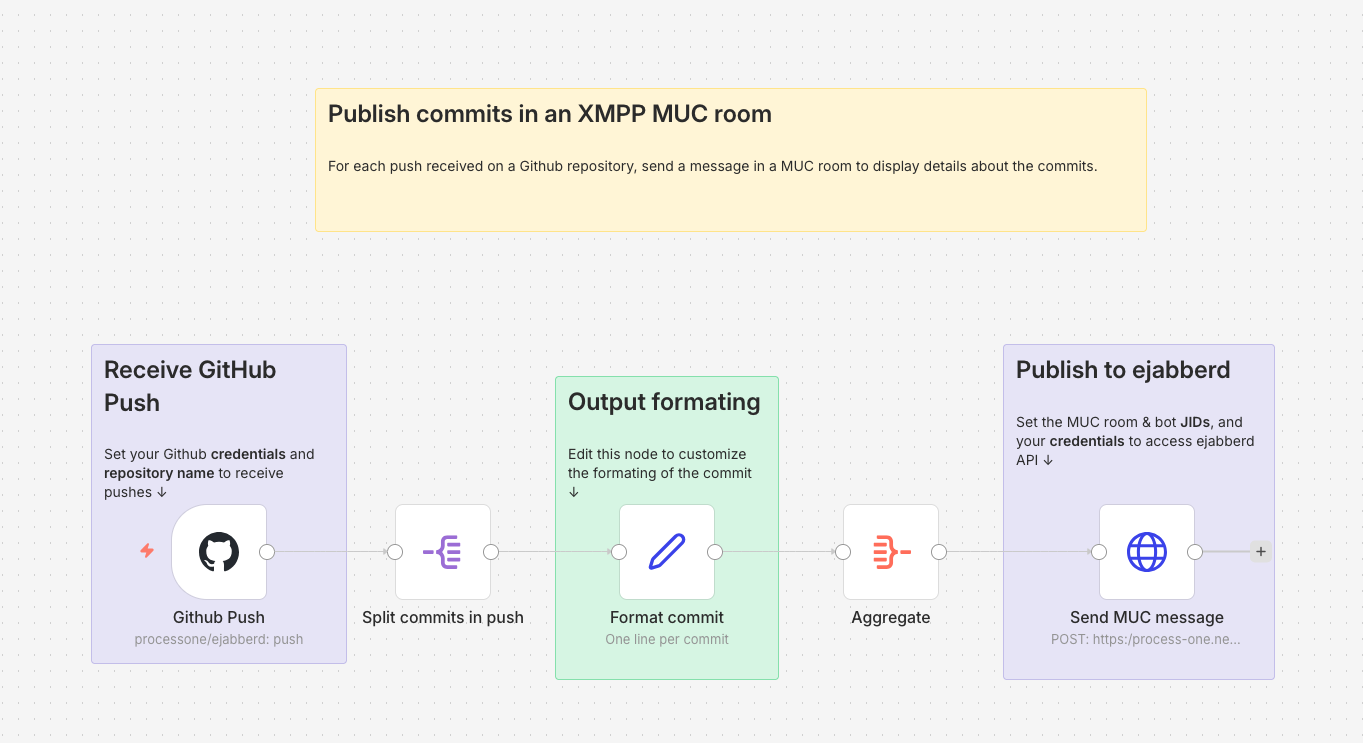
n8n is a platform for workflow automation. Let's see how interface n8n workflows with an XMPP network. As an example on how to use XMPP to receive data from n8n, let's build a simple workflow that publishes into a MUC room some information about each commit pushed to a GitHub repository.
Simple workflow to display Git commits in a MUC room
You can browse and download this workflow here: https://share-n8n.net/shared/l6uiZZ54bPC3
GitHub Trigger
To receive the information about each Git push, we use the GitHub Trigger node. You need to set up some GitHub credentials with access to the repository you want to monitor. Then, set the Repository Owner and Repository Name accordingly. The Events you want to receive are of type Push. At this point, you can execute the workflow (just containing this unique node), do a couple of commits on your repository, and push them to test that it's received by the GitHub Trigger node. When it works, pin the output data of the node so you don't have to push some more commits while you test the rest of the workflow. Don't forget to unpin it once you want to use the workflow for real.
Information Formatting
As you can see in the output data of the GitHub Trigger node, the list of commits in the push are in body.commits. We use a Split Out node on this field to process each one of these commits.
We then use an Edit Fields (Set) node to format the information we will display about each commit in the final message posted in the MUC room, using a Manual Mapping. Just check the input data coming by the previous Split Out node to choose what data you want to send to the MUC room. We name the output field Commit (type: String). Here is an example of such a template:
"{{ $json.message.split('\n')[0] }}" by {{ $json.author.username }} ({{ $json.author.name }} <{{ $json.author.email }}>), {{ $json.modified.length }} modified file{{ $json.modified.length >1 ? "s" : "" }}
The split at the beginning of this example is used to only keep the first line of the commit message.
After that, an Aggregate node will combine the commits info (one per item) into a single item, with this setting:
- Aggregate: Individual Fields
- Input Field Name:
Commit(as named in the previous node)
As a result, we'll have one item containing the list of commits into a Commit field.
ejabberd credentials
We can now send the formatted data to the XMPP server using a HTTP Request node. For that, we use the send_message command from the ejabberd API.
We use an OAuth token to securely call ejabberd API using Bearer Authentication.
Fluux
If you are using a Fluux instance, you can get an OAuth token from your Fluux console, in the API Tokens section.
Self-hosted ejabberd
To create the credentials on your own ejabberd server, you'll need to use the oauth_issue_token command to get an OAuth token. Be sure you have an access rule that allows you to create such a token.
For the scope parameter of oauth_issue_token command, use the one defined in your api_permissions acl (ejabberd:admin in the example below) and be sure the user you issue the token for has the right to call the send_message command.
Extract of an example of an ejabberd.yml file that allows to call send_message using OAuth:
hosts:
  - "process-one.net"

listen:
  -
    port: 5281
    ip: "::"
	tls: true
    module: ejabberd_http
    request_handlers:
      "/api": mod_http_api

acl:
  admin:
    user:
      - "admin@process-one.net"

access_rules:
  muc:
    - allow: all
  muc_create:
    - allow: local
  muc_admin:
    - allow: admin
  oauth_access:
    - allow: admin

api_permissions:
  "console commands":
    from:
      - ejabberd_ctl
    who: all
    what: "*"
  "admin access":
    who:
      - oauth:
        - scope: "ejabberd:admin"
        - access:
          - allow:
            - acl: admin
    what:
      - send_message

modules:
	  mod_http_api: {}
	  mod_muc:
		  access: muc
		  access_create: muc_create
		  access_persistent: muc_create
		  access_admin: muc_admin
Example of a command to create a token with the above config:
ejabberdctl oauth_issue_token admin@process-one.net 360000 ejabberd:admin
Sending the XMPP message using send_message
Now you can create your credentials in the HTTP Request node:
- Authentication: Predefined Credential Type
- Credential Type: Bearer Auth
- Create a new Bearer Auth and put your token in the Bearer Token field.
For the other fields in the HTTP Request node:
- Method:
POST - URL: Full URL of the
send_messagecommand as defined by your ejabberd_api listener, for examplehttps://process-one.net:5281/api/send_message. If you are using Fluux, the URL should behttps://NAME.m.in-app.io:5281/api/send_messagewhereNAMEis your Fluux instance name. - Send Body: enabled
- Body Content Type:
JSON - Specify Body:
Using Fields Below - Body Parameters: set the parameters for the
send_messagecommand:type:groupchatfrom: bare JID of the bot that will post the message in the MUC roomto: bare JID of the MUC roomsubject: empty (not relevant for a MUC message)body: template to format the commit information. For example, to display the name of the repository followed by the list of commits, one per line:
{{ $('Github Push').item.json.body.repository.full_name }} repository:
{{ $json.Commit.join("\n") }}
The n8n workflow should now be working: it will publish all commits pushed on the repository defined in the first node into the MUC room defined in the last node (don't forget to unpin everything).
Same workflow with a custom stanza
You can browse and download this workflow here: https://share-n8n.net/shared/nxmUMbdNM0gH
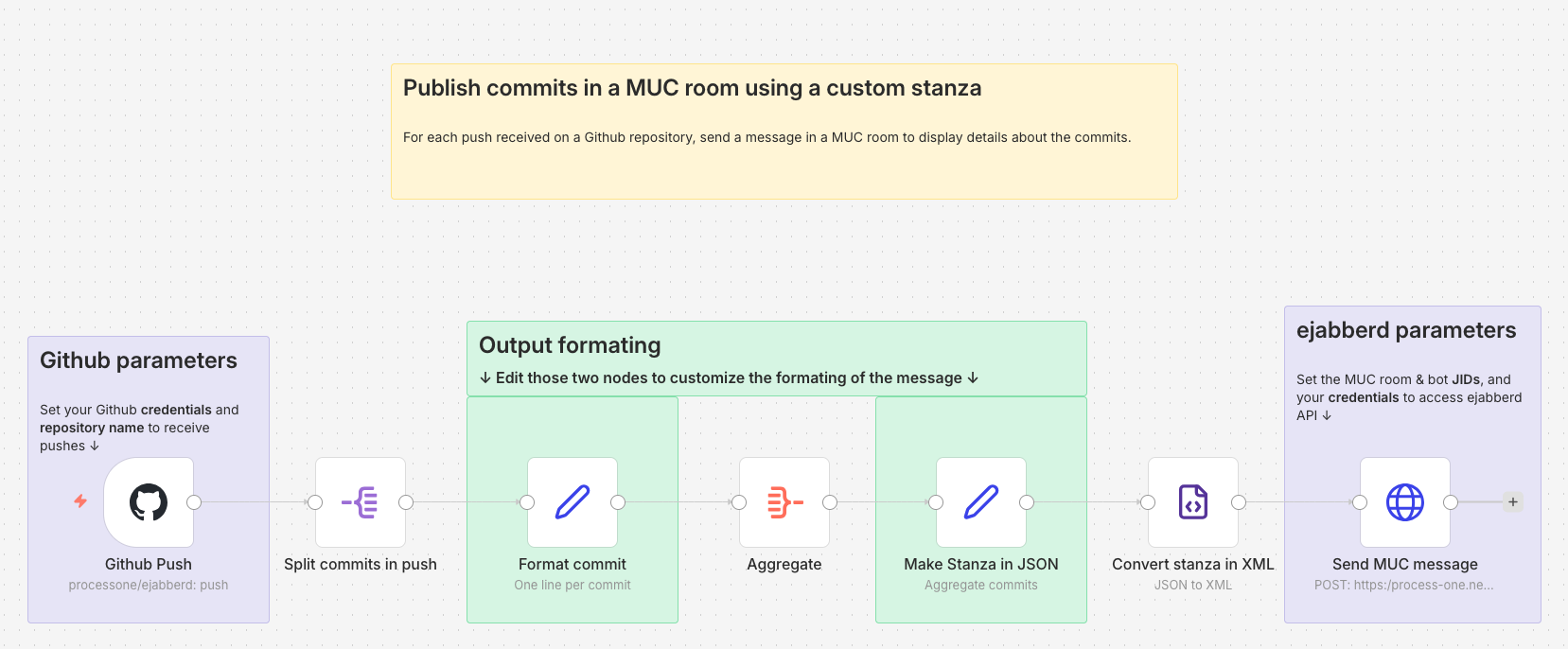
This is a variant of the above workflow to illustrate how to create and send a custom stanza instead of the simple message that send_message API permits. This is needed for example if you want to add an element in a custom namespace into your message stanza.
The minimal stanza for a MUC message is:
<message type="groupchat">
  <body>
	List of commits
  </body>
</message>
We don't need to set the from, to or id attribute, it will be handled by the API call done in the last node. Let's say we want to add a sub-tab containing the timestamp of the moment the message was sent by n8n. The stanza we want to create looks like this:
<message type="groupchat">
  <body>
	List of commits
  </body>
  <n8n xmlns="p1:custom:timestamp">2025-12-17T11:16:13.071-05:00</n8n>
</message>
Create a custom stanza
We want to create that stanza just before the last one, between the Aggregate node and the HTTP Request node. To ensure that all strings from the git commit are correctly encoded for XML, we use the JSON to XML node. This means we have to construct the stanza in JSON first.
This is done in the Make Stanza in JSON node of type Edit Fields (Set). We use the Manual Mapping to ensure all special characters from the git commit are correctly escaped.
- We set a
$field (which is the default Attribute Key) to set the type attribute on the root element. The name of the root element,message, will be set in the next node, JSON to XML. - We create a
bodyfield of type String that will contain the list of commits, one per line. We can use the same template used in the last node of the previous workflow:
{{ $('Github Push').item.json.body.repository.full_name }} repository:
{{ $json.Commit.join("\n") }}
- We add a
n8nfield for the custom tag, with typeObject, to be able to set axmlnsattribute on it:
{
 "_": "{{ $now }}",
 "$": {"xmlns": "p1:custom:timestamp"}
}
Convert the stanza in XML
The stanza is converted in XML in the Convert stanza in XML, XML node:
- The Mode is JSON to XML
- Property Name is the name of the field in the output data, let's name it
stanza. - We have to enable the Headless option to prevent the XML header to be added before the message.
- The Root Name is set to
message(the root element of the stanza) as the JSON received from the previous node is just the content of the XML document.
Sending the XMPP message using send_stanza
The configuration of the HTTP Request node is the same than for the previous workflow, except that the URL must call send_stanza instead of send_message. The body parameter is replaced by the stanza one, in which we just have to set the stanza field from the previous node:
{{ $json.stanza }}
Be sure to adapt your ejabberd configuration accordingly, specifically to allow send_stanza to be called.