

🚀 ejabberd 26.01
We are pleased to announce ejabberd 26.01. This release addresses real operational pain points: export your data from one database backend and import it into another, and let your users invite others without opening the gates to spam.



This release is the result of three months of development, implementing those new features, and fixing bugs.
Release Highlights:
If you are upgrading from a previous version, there are no mandatory changes in SQL schemas, configuration, API commands or hooks. However new mod_invites uses a new table in databases, see below.
Other contents:
- SQL table for
mod_invites - New
replaced_connection_timeout - Improved
mod_http_fileserverdocrootoption - Supported XEP Versions
- Erlang, Elixir and Container
- Improved
ERL_DIST_PORT - New
make relivectl - WebAdmin Menu Links
- Acknowledgments
- Improvements in ejabberd Business Edition
- ChangeLog
- ejabberd 26.01 download & feedback
Below is a detailed breakdown of the improvements and enhancements:
Database Serialization
This feature adds new way for migrating data between database backends by exporting data from one backend to a file and importing that into different backend (or possibly to same backend but on different machine).
Migrating data using this can be executed by first exporting all data with export_db command, changing configuration of ejabberd and switching modules to use new database backend, and then importing previously exported data using import_db command.
This mechanism works by calling those new command from ejabberdctl, for exporting data:
ejabberdctl export_db <host name> <path to directory where exported files should be placed>ejabberdctl export_db_abort <host name>ejabberdctl export_db_status <host name>
and for importing:
ejabberdctl import_db <host name> <path to directory with exported data>ejabberdctl import_db_abort <host name>ejabberdclt import_db_status <host name>
Exporting and importing work in background after starting them from ejabberdctl (commands executed by ejabberdctl have time limit for how long they can work, with this setup there should be not issue with export or import getting aborted by that), and current progress of background operation can be tracked by calling corresponding *_db_status command. Operation in progress can be also aborted by executing *_db_abort command.
Roster Invites and Invite-based Account Registration
Until now the canonical method to register an account in ejabberd was to let anybody register accounts using In-Band Registration (IBR) (mod_register) or Web Registration (mod_register_web), and then try to limit abuse with access limitations or CAPTCHAs. Often this process got abused, with the result that account registration had to be disabled and rely on manual registration by administrators.
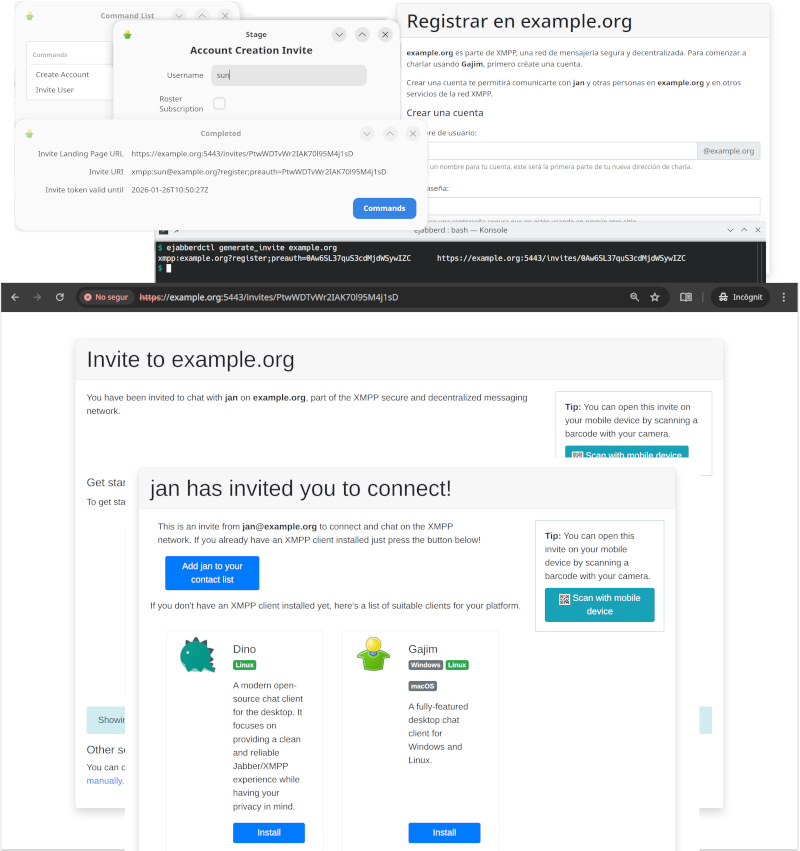
The new mod_invites implements support for invite-based account registration: administrators can generate invitation URLs, and send them to the desired users (by email or whatever). Then the user that receives an invitation can visit this invitation URL to register a new account.
On top of that, mod_invites lets you create Roster Invites: you can send a link to some other person so they can connect to you in a very user-friendly and intuitive way that doesn't require any further interaction. If account creation is allowed, these links will also allow to setup an account in case the recipient doesn't have one yet.
Relevant links:
- mod_invites documentation
- Great Invitations, the original Prosody blog post that described this feature
- XEP-0379: Pre-Authenticated Roster Subscription
- XEP-0401: Ad-hoc Account Invitation Generation
- XEP-0445: Pre-Authenticated In-Band Registration
- This development was funded by NLnet
Quick setup:
-
If using SQL storage for the modules and have disabled the update_sql_schema toplevel option, then create manually the SQL table, see below.
-
If you plan to use the landing page included with
mod_invites, install JavaScript libraries jQuery version 3.7.1 and Bootstrap version 4.6.2. This example configuration will assume they are installed in/usr/share/javascript. Theejabberdcontainer image already includes those libraries. Some quick examples, in case you need some help:-
Debian and related:
apt install libjs-jquery libjs-bootstrap4 -
AlpineLinux and other operating systems where you can install
npm, for example:apk -U add --no-cache nodejs npm ca-certificates npm init -y \ && npm install --silent jquery@3.7.1 bootstrap@4.6.2 mkdir -p /usr/share/javascript/jquery mkdir -p /usr/share/javascript/bootstrap4/{css,js} cp node_modules/jquery/dist/jquery.min.js /usr/share/javascript/jquery/ cp node_modules/bootstrap/dist/css/bootstrap.min.css /usr/share/javascript/bootstrap4/css/ cp node_modules/bootstrap/dist/js/bootstrap.min.js /usr/share/javascript/bootstrap4/js/ -
Generic method using the included script:
tools/dl_invites_page_deps.sh /usr/share/javascript
-
-
Configure ejabberd to serve the JavaScript libraries in path
/share; serve mod_invites in any path of your selection; and enable mod_invites with some basic options. Remember to setup mod_register to allow registering accounts using mod_invites. For example:listen: - port: 5443 ip: "::" module: ejabberd_http tls: true request_handlers: /invites: mod_invites /share: mod_http_fileserver modules: mod_http_fileserver: docroot: /share: /usr/share/javascript mod_invites: access_create_account: configure landing_page: auto mod_register: allow_modules: - mod_invites -
There are many ways to generate invitations:
- Login with an admin account, then you can execute Ad-Hoc Commands like "Invite User" and "Create Account"
- If mod_adhoc_api is enabled, you can execute equivalent API Commands generate_invite and generate_invite_with_username
- Run those API Commands from the command-line, for example:
ejabberdctl generate_invite localhost
-
All those methods give you an invitation URL that you can send it to the desired user, and looks like
https://localhost:5443/invites/Yrw5nuC1Kpxy9ymbRzmVGzWQ -
The destination user (or yourself) can visit that invitation URL and follow the instructions to register the account and download a compatible client.
If the user has installed already a compatible XMPP client, you don't no need to install JavaScript libraries and setup a landing page. In that case, when generating an invitation you will get only the XMPP URI; when the user opens that URI in a web browser, it will automatically open the XMPP client and the corresponding registration window.
Probably you don't want to expose the port directly, then you need to setup Nginx or Apache to act as a "reverse" proxy and change your landing_page parameter accordingly, for example just https://@HOST@/invites/{{ invite.token }}
Notice that the landing page can be fully translated using the existing ejabberd localization feature.
SQL table for mod_invites
There is a new table invite_token in SQL schemas, used by the new mod_invites. If you want to use this module, there are two methods to update the SQL schema of your existing database:
If using MySQL or PosgreSQL, you can enable the option update_sql_schema and ejabberd will take care to update the SQL schema when needed: add in your ejabberd configuration file the line update_sql_schema: true
Notice that support for MSSQL in mod_invites has not yet been implemented or tested.
If you are using other database, or prefer to update manually the SQL schema:
-
MySQL singlehost schema:
CREATE TABLE invite_token ( token text NOT NULL, username text NOT NULL, invitee text NOT NULL DEFAULT (''), created_at timestamp NOT NULL DEFAULT CURRENT_TIMESTAMP, expires timestamp NOT NULL, type character(1) NOT NULL, account_name text NOT NULL, PRIMARY KEY (token(191)) ) ENGINE=InnoDB CHARACTER SET utf8mb4 COLLATE utf8mb4_unicode_ci; CREATE INDEX i_invite_token_username USING BTREE ON invite_token(username(191)); -
MySQL multihost schema:
CREATE TABLE invite_token ( token text NOT NULL, username text NOT NULL, server_host varchar(191) NOT NULL, invitee text NOT NULL DEFAULT '', created_at timestamp NOT NULL DEFAULT CURRENT_TIMESTAMP, expires timestamp NOT NULL, type character(1) NOT NULL, account_name text NOT NULL, PRIMARY KEY (token(191)), ) ENGINE=InnoDB CHARACTER SET utf8mb4 COLLATE utf8mb4_unicode_ci; CREATE INDEX i_invite_token_username USING BTREE ON invite_token(username(191)); -
PostgreSQL singlehost schema:
CREATE TABLE invite_token ( token text NOT NULL, username text NOT NULL, invitee text NOT NULL DEFAULT '', created_at timestamp NOT NULL DEFAULT now(), expires timestamp NOT NULL, "type" character(1) NOT NULL, account_name text NOT NULL, PRIMARY KEY (token) ); CREATE INDEX i_invite_token_username ON invite_token USING btree (username); -
PostgreSQL multihost schema:
CREATE TABLE invite_token ( token text NOT NULL, username text NOT NULL, server_host text NOT NULL, invitee text NOT NULL DEFAULT '', created_at timestamp NOT NULL DEFAULT now(), expires timestamp NOT NULL, "type" character(1) NOT NULL, account_name text NOT NULL, PRIMARY KEY (token) ); CREATE INDEX i_invite_token_username_server_host ON invite_token USING btree (username, server_host); -
SQLite singlehost schema:
CREATE TABLE invite_token ( token text NOT NULL, username text NOT NULL, invitee text NOT NULL DEFAULT '', created_at timestamp NOT NULL DEFAULT CURRENT_TIMESTAMP, expires timestamp NOT NULL, type character(1) NOT NULL, account_name text NOT NULL, PRIMARY KEY (token) ); CREATE INDEX i_invite_token_username ON invite_token(username); -
SQLite multihost schema:
CREATE TABLE invite_token (
    token text NOT NULL,
    username text NOT NULL,
    server_host text NOT NULL,
    invitee text NOT NULL DEFAULT '',
    created_at timestamp NOT NULL DEFAULT CURRENT_TIMESTAMP,
    expires timestamp NOT NULL,
    type character(1) NOT NULL,
    account_name text NOT NULL,
    PRIMARY KEY (token)
);

CREATE INDEX i_invite_token_username_server_host ON invite_token(username, server_host);
New replaced_connection_timeout toplevel option
The new replaced_connection_timeout toplevel option enables new session to wait for termination of session that it replaces.
This should mitigate problems where old session presences unavailable sometimes were delivered after new session sent it's presence available.
Improved mod_http_fileserver docroot option
mod_http_fileserver is a module to serve files from the local disk over HTTP, useful if you just want to serve some HTML or binary files that don't need PHP, and don't need to setup or configure a separate full-blown web server.
Now the docroot option may be a map of paths to serve, allowing this module to serve several paths with different directories for different purposes.
For example, let's serve some public content from /var/service/www, also shared JavaScript libraries, and for base URL let's serve from /var/www:
listen:
  -
    port: 5280
    module: ejabberd_http
    request_handlers:
      /pub/content: mod_http_fileserver
      /share: mod_http_fileserver
      /: mod_http_fileserver
modules:
  mod_http_fileserver:
    docroot:
      /pub/content: /var/service/www
      /share: /usr/share/javascript
      /: /var/www
Notice that ejabberd includes many modules that serve web services, that may be useful to save you from setting up a full-blown web server, see ejabberd_http.
Supported XEP versions
ejabberd supports close to 90 XMPP extension protocols (XEPs), either directly implemented in ejabberd source code, in the libraries that implement many of the internal features, or in other ejabberd modules available in other repositories like ejabberd-contrib.
Those XEPs are updated regularly to bring major improvements, minor changes, fixing typos, editorial or cosmetic changes... and this requires a regular review of those XEP updates in the software implementations to keep them up to date, or at least to document what exact version of the protocols are implemented.
In this sense, we have reviewed all the XEP versions that ejabberd and erlang xmpp library were not up-to-date, and have identified which ones are already up-to-date in their DOAP files. Now the pages at XMPP.org describe more accurately the supported protocol versions, see ejabberd at XMPP.org and erlang-xmpp at XMPP.org.
Erlang, Elixir and Container
ejabberd can be compiled with Erlang/OTP from 25.0 up to the latest 28.3.1. Regarding Elixir support, ejabberd supports from Elixir 1.14.0 up to the latest 1.19.5
Right now ejabberd compiles correctly with Erlang/OTP from git development branch and Elixir 1.20.0-RC1, so hopefully compatibility with the upcoming Erlang/OTP 29 and Elixir 1.20 will be easily achievable.
Binary installers and the ejabberd container now include Erlang/OTP 28.3.1 instead of 27.3, and Elixir 1.19.5 instead of 1.18.4.
Speaking of the container images, both ejabberd and ecs bring other minor changes: they expose more ports: 5478 UDP (STUN service), 7777 (SOCKS5 file transfer proxy) and 50000-50099 UDP (TURN service).
The container images in their ejabberd.yml file use new macros PORT_TURN_MIN, PORT_TURN_MAX, and STARTTLS_REQUIRED that you can setup easily without modifying ejabberd.yml, see macros in environment.
Improved ERL_DIST_PORT
ejabberd uses Erlang Distribution in the ejabberdctl shell script and also for building a cluster of ejabberd nodes.
That Erlang Distribution has historically used the epmd program to assign listening ports and discover ports of other nodes to connect. The problems of using epmd are that:
epmdmust be running all the time in order to resolve name queriesepmdlistens in port4369- the ejabberd node listens in a random port number
How to avoid epmd since Erlang/OTP 23.1 and ejabberd 22.10 ? Simply set the ERL_DIST_PORT environment variable in the ejabberdctl.cfg file:
ERL_DIST_PORT=5210
Since now, ejabberdctl passes arguments to Erlang to listen for erlang distribution connections in TCP port 5210, and establish erlang distribution connections to remote ports 5210. That way you know exactly, in advance, what port number to open in the firewall or container.
This ejabberd release introduces some small improvements that facilitate using the ERL_DIST_PORT environment variable:
-
ejabberdctlprints an informative message when it detects that there may be a port number collision, which may happen if you start several ejabberd nodes in the same machine listening in the sameERL_DIST_PORTand sameINET_DIST_INTERFACE. -
When ejabberd is starting, now it prints the address and port number where it listens for erlang distribution:
[info] ejabberd 26.01 is started in the node ejabberd@localhost in 1.90s [info] Elixir 1.19.4 (compiled with Erlang/OTP 28) [info] Erlang/OTP 29 [DEVELOPMENT] [erts-16.2] [source] [64-bit] [smp:4:4] [ds:4:4:10] [async-threads:1] [jit:ns] [info] Start accepting TCP connections at 0.0.0.0:5210 for erlang distribution [info] Start accepting TCP connections at [::]:5222 for ejabberd_c2s [info] Start accepting TCP connections at [::]:5269 for ejabberd_s2s_in ... -
A new make relivectl is introduced, which uses
ejabberdctlscript to start ejabberd (not likemake relive), and starts ejabberd immediately without building a release (not likemake dev). -
The ejabberd Documentation site has improved and updated pages about Security, Erlang Distribution, and Clustering.
New make relivectl
make relive was introduced in ejabberd 22.05. It allows to start ejabberd in path _build/relive/ without installing it, by using rebar3 shell and mix run. It automatically compiles code at start and recompiles changed code at runtime. But it doesn't use the ejabberdctl script, and doesn't read ejabberdctl.cfg, this means that depending on what you are testing, it may not be useful and you had to switch to make dev.
A new make target is now introduced: make relivectl. This is similar, as it starts ejabberd without requiring installation, using path _build/relivectl/ to store the configuration, database and log files. The benefit over relive is that relivectl uses ejabberdctl and reads ejabberdctl.cfg. The drawback is that it doesn't recompile code automatically. The benefit over make dev is that relivectl doesn't build an OTP release, so it's faster to start.
Let's summarize all the make targets related to installation to determine their usage differences:
make ... |
install |
install-rel |
prod |
dev |
relivectl |
relive |
|---|---|---|---|---|---|---|
| Writes files in path | / |
/ |
_build/prod/ |
_build/dev/ |
_build/relivectl/ |
_build/relive/ |
| Installs | ✅ | ✅ | manually uncompress *.tar.gz |
- | - | - |
| Uninstall with | uninstall⚠️ incomplete |
uninstall-rel✅ |
manual remove | - | - | - |
| Start tool | ejabberdctl | ejabberdctl | ejabberdctl | ejabberdctl | ejabberdctl | rebar3/mix |
Reads ejabberdctl.cfg |
✅ | ✅ | ✅ | ✅ | ✅ | ❌ |
| Recompiles | - | ✅ | ✅ | ✅ | ❌ | ✅ |
| Starts ejabberd | - | - | - | - | ✅ | ✅ |
| Recompiles at runtime | - | - | - | - | ❌ | ✅ |
| Execution time (s.) | 13 | 40 | 57 | 35 | 4 | 9 |
As seen in the table, make install / uninstall seem unnecessary nowadays, because install-rel / uninstall-rel allow to install and uninstall correctly all the files. Maybe in the future the implementation of make install / uninstall could get replaced with make install-rel / uninstall-rel...
In the same sense, make dev now apparently falls short between make prod (which is absolutely indispensable to build a full OTP release) and make relive/relivectl (useful, featureful, and fast for development and testing purposes).
WebAdmin Menu Links
Do you remember that ejabberd 25.07 introduced a link in WebAdmin to the local Converse.js page in the left menu when the corresponding mod_conversejs is enabled?
Technically speaking, until now the WebAdmin menu included a link to the first request_handler with mod_conversejs that the admin configured in ejabberd.yml. That link included the authentication credentials hashed as URI arguments if using HTTPS. Then process/2 extracted those arguments and passed them as autologin options to Converse.
From now, mod_conversejs automatically adds a request_handler nested in WebAdmin subpath. The WebAdmin menu links to that converse URI; this allows to access the HTTP auth credentials, no need to explicitly pass them. process/2 extracts this HTTP auth and passes autologin options to Converse. Now scram password storage is supported too.
In practice, what does all that mean? Just enable the mod_conversejs module, and WebAdmin will have a private Converse URL for the admin, linked in the WebAdmin menu, with autologin. No need to setup a public request_handler!
For example, let's configure conversejs only for admin usage:
listen:
  -
    port: 5443
    module: ejabberd_http
    tls: true
    request_handlers:
      /admin: ejabberd_web_admin
      /ws: ejabberd_http_ws

modules:
  mod_conversejs:
    conversejs_resources: "/home/conversejs/12.0.0/dist"
Of course, you can setup a public request_handler and tell your users to access the corresponding URL:
listen:
  -
    port: 5443
    module: ejabberd_http
    tls: true
    request_handlers:
      /admin: ejabberd_web_admin
      /public/web-client: mod_conversejs
      /ws: ejabberd_http_ws

modules:
  mod_conversejs:
    conversejs_resources: "/home/conversejs/12.0.0/dist"
With that configuration, what is the corresponding URL?
Login to the WebAdmin and look at the left menu: now it displays links to all the configured HTTP services: ejabberd_captcha, ejabberd_oauth, mod_conversejs, mod_http_fileserver, mod_register_web. Also mod_muc_log_http and mod_webpresence from ejabberd-contrib show links in the WebAdmin left menu. Additionally, the menu shows a lock if the page is encrypted HTTPS, and an ! if it is not.
Acknowledgments
We would like to thank the contributions to the source code, documentation, and translation provided for this release by:
- Stefan Strigler for new feature Great Invitations aka
mod_invites - Kirill A. Korinsky and Greg Troxel for
ejabberdctlsupport NetBSD and OpenBSDsu - Christoph Scholz for fix preload_rooms in case of SQL-DB
- Mr. EddX and Kiril Panayotov for updating the Bulgarian translation
- Sketch6580 for updating the Chinese (Simplified) translation
- poVoq, Nautilusx and Stefan Strigler for updating the German translation
- Stefan Strigler for updating the Swedish translation
And also to all the people contributing in the ejabberd chatroom, issue tracker...
Improvements in ejabberd Business Edition
Customers of the ejabberd Business Edition, in addition to all those improvements and bugfixes, also get the following changes:
- New module
mod_push_gatethat can act as target service formod_push, and which can deliver pushes using configured mod_gcm or mod_applepush instances. - New module
mod_push_templatesthat can be used to have different push notifications for message class matching configured data patterns. - New database conversion routines targeting p1db backends
ChangeLog
This is a more complete list of changes in this ejabberd release:
Compile and Start
- Remove dependencies, macros and code for Erlang/OTP older than 25
- Require Elixir 1.14 or higher, that's the lowest we can test automatically
ejabberdctl: Support NetBSD and OpenBSDsu(#4320)ejabberdctl.template: Show meaningful error whenERL_DIST_PORTis in useejabberd_app: Print address and port where listens for erlang node connectionsMakefile.in: Addmake relivectlsimilar torelivebut usingejabberdctl
Databases
- Add db_serialize support in mnesia modules
- Add db serialization to
mod_muc_sql - New database export/import infrastructure
- Add commands for new database export/import
- Apply timestamp pass in
?SQL_INSERTqueries - Update p1_mysql to bring fix for timestamp decoding
- Extend timestamp type handling in sql macros
- Revert changes to conversion of pgsql
inttypes
Installer and Container
make-binaries: Bump Erlang/OTP 28.3.1 and Elixir 1.19.5Dockerfile: Bump Erlang/OTP 28.3.1 and Elixir 1.19.5Dockerfile: Expose also port 7777 for SOCKS5Dockerfile: Configure TURN ports and expose 5478 50000-50099Dockerfile: Try to fix error with recentfreetdsAlpine package- Container: Setup new macro
STARTTLS_REQUIREDto allow easy disabling
MUC
- Add
muc_online_rooms_countAPI command - Set
enable_hatsroom optiontrueby default - Allow vcard queries even when IQ queries are disabled (#4489)
- Announce
stable-idfeature from XEP-0045 1.31, supported since long ago - Fix
preload_roomsin case of SQL database (#4476) - Run new hooks:
registering_nickmucandregistered_nickmuc(#4478) - When deleting account, unregister account's nicks in all MUC hosts (#4478)
mod_muc_log: Crash interminate/2when stopping module (#4486)mod_muc_occupantid: Keep salt per MUC service, not individual roomsmod_muc_room: Rewrite hats code that gets xdata valuesmod_muc_room: Handle hats without definition (#4503)mod_muc_room: When user has no hats, don't store in hats_users
WebAdmin
ejabberd_http: Run newhttp_request_handlers_initfold hookejabberd_http: Add helperget_auto_urls/2that returns all URLs and TLSejabberd_web_admin: Add helper functionsmake_menu_systemejabberd_web_admin: Show menu system only when can view vhostsejabberd_web_admin: Pass Level inwebadmin_menu_system_postandinsidehooksmod_conversejs: Improve link to conversejs in WebAdmin (#4495)- When epmd isn't running show explanation in Clustering WebAdmin page
- Use improved WebAdmin menu system in more modules
- When building WebAdmin menu system,
{URLPATH}in link text is substituted
Web Services
rest: Use separatehttpcprofileejabberd_captcha: Usemod_host_meta:get_auto_url/2ejabberd_http: Support repeated module in request_handlersejabberd_http: Get back handling when BOSH or WS are disabledmod_host_meta: Moveget_urlfunctions frommod_host_metatoejabberd_httpmod_host_meta: Allow callingget_url/2for other modules, not only WebSocketmod_host_meta: Cosmetic rename Module to Handlermod_http_upload: Newcontent_typeoption similar tomod_http_fileserver(#4488)mod_http_upload: Pass ServerHost, not Host which may be"upload.HOST"mod_http_upload: Amend the fix for #4450 to support IDNA correctly (#3519)mod_http_fileserver: Support map of paths indocrootoptionmod_conversejs: Add new Conversejs Paths and ContentTypes (#4511)mod_conversejs: Use ContentType functions frommod_http_fileserver(#4511)- Use
/websocketURL in default configuration likemod_conversejs, it's more meaningful
Core and Modules
- Add
replaced_connection_timeouttoplevel option - Fix nasty SSL warnings (#4475)
ejabberd_commands: Show meaningul error message when problem executing command (#4506)ejabberd_logger: Append "color clean" only in console template, not fileejabberd_oauth: Log error ifoauth_list_tokensexecuted with unsupported DB (#4506)misc: Get back functions and mark them as deprecatedmod_adhoc_api: Show nice command name, as WebAdmin already doesmod_pubsub: Deliver pubsub notifications to remote servers for nodes with presence based deliverymod_scram_update: Don't hard-code iteration count- Bump many XEPs versions that are already supported
- Improve documentation of
install_contrib_modules(#4487)
Full Changelog
https://github.com/processone/ejabberd/compare/25.10...26.01
ejabberd 26.01 download & feedback
As usual, the release is tagged in the Git source code repository on GitHub.
The source package and installers are available in ejabberd Downloads page. To check the *.asc signature files, see How to verify ProcessOne downloads integrity.
For convenience, there are alternative download locations like the ejabberd DEB/RPM Packages Repository and the GitHub Release / Tags.
The ecs container image is available in docker.io/ejabberd/ecs and ghcr.io/processone/ecs. The alternative ejabberd container image is available in ghcr.io/processone/ejabberd.
If you consider that you've found a bug, please search or fill a bug report on GitHub Issues.